
- Posts: 12
- Thank you received: 0
Upload Audio- and Video-Data
- Cees van Ooijen
-

- Offline
- New Member
-

Less
More
27 Nov 2026 12:58 #8630
by Cees van Ooijen
Replied by Cees van Ooijen on topic Upload Audio- and Video-Data
Thank you
Indeed this works fine, the folder for this month opens automatically and much faster than the full directory
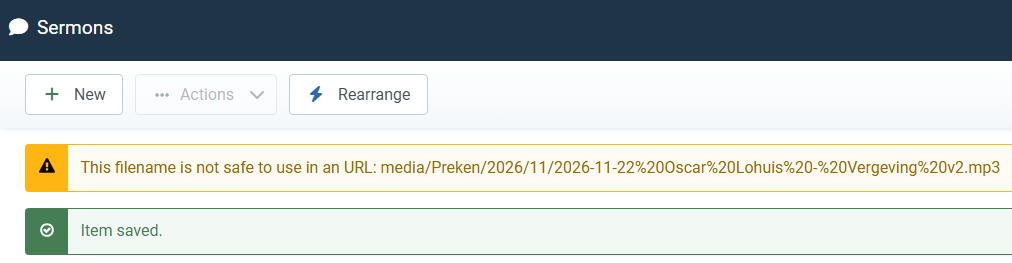
But now I get a warning about the URL format. Whatever I do it kept coming, even with an older uploaded sermon that never gave this warning
In the previous construction the file name was automatically changed - replacing spaces with hyphens.But if I now do that manually it also gives the warning.
But on the website itself the URL comes out differently
It is not a big deal, it works, but it is a bit puzzling
Please Log in or Create an account to join the conversation.
- Thomas Hunziker
-

- Offline
- Administrator
-

27 Nov 2026 13:10 #8631
by Thomas Hunziker
Replied by Thomas Hunziker on topic Upload Audio- and Video-Data
That is true, Joomla doesn't change the filename when uploading a file. SermonSpeaker did that.
I'm thinking how I can enhance the warning message with a button to automatically renamed the file in future.
The warning message is a test using a Joomla function. Joomla uses it for the alias of articles. The same rules that apply for those alias, technically apply for filenames as well. But most of the time it will also work with those encoded spaces (%20) and similar special characters. It is just not ideal and bad practice.
If that warning message bothers you, you can disable the check in the SermonSpeaker options.
The following user(s) said Thank You: Cees van Ooijen
Please Log in or Create an account to join the conversation.
Time to create page: 0.198 seconds